
Business automation for the admin that eats your week.
Somebody in your business retypes the same information into three places every day. Quotes into a template, jobs into a spreadsheet, invoices into accounting. Business automation connects those steps so the information moves itself, and gives that person their week back. Fixed price per workflow, quoted after a free audit you keep either way.
Business automation from R9,500 per workflow, or R24,000 for three, fixed in writing first.
Workflows running
What business automation can take off your desk
Every item below is built regularly for South African companies using tools that already exist and systems you probably already pay for. Nothing here needs new software bought on our recommendation.
Quote generation and sending
Enquiry details flow into your quote template, priced from your rate card, branded and sent. Twenty minutes becomes two, and nothing gets mistyped.
Invoicing on job completion
The moment a job is marked done, the invoice is raised in your accounting system and emailed. No month-end scramble reconstructing what was delivered.
Job cards and scheduling
Accepted quotes become job cards automatically, assigned to the right person with customer details, location and requirements already filled in.
Follow up sequences
Quotes unanswered after three days, services falling due, invoices past terms. Sent on schedule, in your voice, without anyone keeping a list in their head.
Onboarding new customers
Welcome message, document requests, contract sent for signature, details captured. The same experience for every client, every time.
Document processing
Supplier invoices, delivery notes and application forms read automatically, values extracted and filed where they belong instead of captured by hand.
Reporting and dashboards
The numbers you check weekly, compiled and delivered Monday morning. Sales, outstanding quotes, jobs in progress, money owed, without building a spreadsheet.
Stock and reorder alerts
Levels tracked against your movement, with alerts before you run out and draft purchase orders ready to approve rather than compile.
Compliance reminders
Certificates expiring, licences due, vehicle services, contract renewals. Tracked and flagged early, which matters in regulated industries.
Review requests
Sent a day after a completed job with a direct link that follows Google review guidelines. This one often pays for itself through local rankings alone.
Data moving between systems
Website, WhatsApp, spreadsheet, CRM and accounting talking to each other, so information is entered once and appears everywhere.
Call and meeting summaries
Recordings turned into structured notes with actions assigned, so nothing agreed on a call disappears the moment it ends.
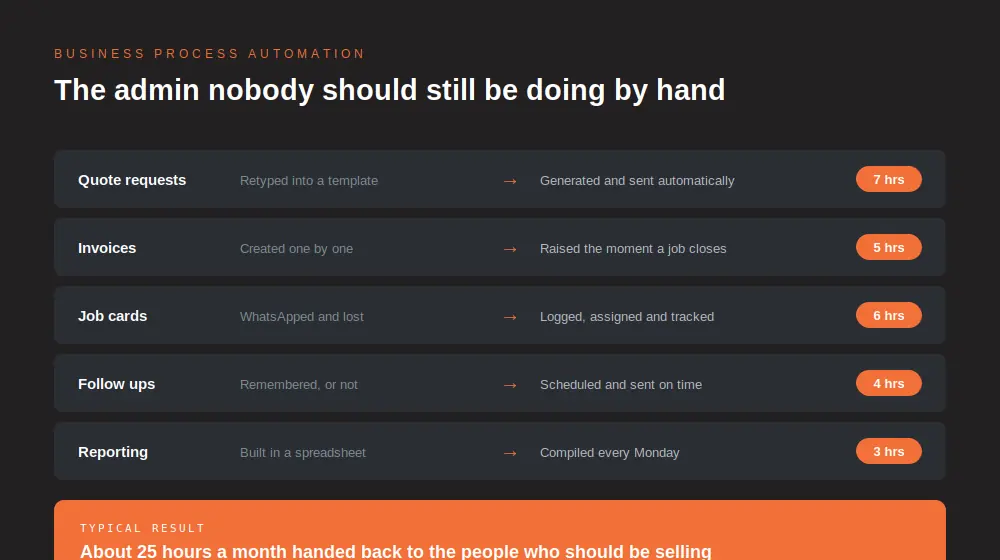
Roughly 25 hours a month handed back to the people who should be selling.
One workflow, start to finish, with the numbers
Business automation for a services company handling roughly forty enquiries a month. This is the most common first workflow we build, and these are the numbers that make the case rather than the ones that sound impressive.
| Step | Before | After | Time saved |
|---|---|---|---|
| Enquiry captured | Read message, copy into spreadsheet | Captured automatically with all details | 3 hrs a month |
| Quote produced | Open template, retype, price manually | Generated from the rate card, ready to check | 7 hrs a month |
| Quote followed up | Remembered, sometimes | Sent automatically on day three | 4 hrs a month |
| Job card raised | Retyped from the accepted quote | Created and assigned on acceptance | 6 hrs a month |
| Invoice issued | Compiled at month end | Raised the moment the job is marked done | 5 hrs a month |
| Review requested | Almost never | Sent a day after completion | Rankings improve |
What that adds up to
- Roughly 25 hours a month returned. At R150 an hour of admin time that is about R3,750 a month in labour alone.
- Quotes going out same day instead of next week. Usually the single biggest revenue effect, because speed wins work.
- Every quote followed up. The ones that used to be forgotten get chased on schedule, and a share of them close.
- Invoices raised on time. Cash arrives earlier because nothing waits for month end to be remembered.
- A steady flow of reviews, which feeds directly into local search rankings and brings in more enquiries.
- Paid back in about three months at R9,500. That is typical for a first workflow, and we will tell you when your numbers do not support it.
Most business automation does not need AI at all
This is where a lot of money gets wasted in this market. Suppliers wrap ordinary rules-based plumbing in AI language and charge accordingly. We split it honestly, because you should only pay for judgement where judgement is actually required.
Rules, and they should be cheap
If a step follows a rule, it needs logic and not a language model. Raising an invoice when a job is marked complete is an if-then, and paying AI prices for it is paying for a label.
- Raising invoices on completion
- Sending follow ups on a schedule
- Creating job cards from accepted quotes
- Moving data between systems
- Stock alerts and compliance reminders
Judgement, and it is worth paying for
Where a step requires reading something unstructured and deciding what it means, a language model genuinely does work no rule can. That is where the premium belongs and nowhere else.
- Reading a supplier invoice in any format
- Summarising a call into actions
- Interpreting a free-text enquiry
- Drafting a reply in your tone
- Classifying documents nobody labelled
Your quote itemises which is which. If most of your workflow is rules, your quote should be at the lower end, and we will say so rather than let the AI in our name inflate the number.
What we will not automate
Business automation done badly produces the wrong result faster and at scale. These are the five things we decline, and the reasons are commercial rather than technical.
Five refusals
- A broken process. Automating a bad workflow just industrialises the problem. We fix it first, which usually makes the build smaller and your quote cheaper.
- Anything that fires money without a human. Payments out, credit notes and refunds get a person in the loop. Always.
- Complaint handling. The moment a customer is unhappy, a person takes it. Automating that reply costs you the relationship you were trying to protect.
- Decisions with legal weight. Contract terms, employment matters and anything a regulator could ask about. We build the paperwork flow, you make the call.
- Mass unsolicited messaging. It breaches platform rules, it is a POPIA problem, and it damages the brand you are paying us to build.
We deliver business automation across Johannesburg, Sandton, Midrand, Centurion, Pretoria, Cape Town, Durban, Gqeberha, Bloemfontein and Polokwane, and remotely anywhere in the country. Regional clients in Zimbabwe, Kenya and Botswana are quoted in local currency.
How a workflow actually gets built
Business automation starts with mapping the process before touching any software, because automating a broken process just produces the wrong result faster.
Process audit
We sit with whoever actually does the work and map every step, including the shortcuts nobody documented. Free, and yours to keep whatever you decide.
Pick the workflow
We start with the one costing you the most hours, not the one that is easiest to build. You get a fixed price for it before anything begins.
Build and connect
Wired into the tools you already use. New software only when there is genuinely nothing in your stack that can do the job.
Run it alongside
For two weeks the automation runs next to your manual process so you can compare outputs and trust it before switching over.
Hand over and support
Your team is trained, documentation is written, and monthly support keeps it running as your business changes.
What you own when it is finished
- The workflow itself, documented step by step so another competent supplier could pick it up.
- The accounts it runs on, in your name, on tools you already pay for rather than on a platform we resell.
- The data it produces, exportable in full, sitting in systems you control.
- The right to leave on thirty days notice with all of the above still running.
Business automation pricing, published in full
Quoted per workflow after the free audit, as a fixed price. Most businesses start with one, see the effect on a real month, then add the next.
Single workflow
One process automated end to end, connected to your existing tools, with your team trained on it.
- Process mapped and documented
- Built and tested alongside your manual process
- Team training and handover
- Thirty days of adjustments included
Three workflow build
The usual package once a business has seen the first one work. Quoting, job management and invoicing together.
- Three processes automated
- Systems connected to each other
- Weekly reporting built in
- Documentation for your team
- Support plan from R1,450 a month
Ongoing support
Monitoring, fixes when a connected system changes, and adjustments as your process evolves.
- Workflow monitoring and alerts
- Changes when your process changes
- New steps added on request
- Monthly performance summary
Not sure where to start? The AI consulting roadmap costs R6,500 and is credited in full against your first build. Customer facing automation sits on WhatsApp automation and AI chatbots.
Business automation questions we get asked
What does business process automation cost in South Africa?
Business automation starts at R9,500 for a single workflow as a fixed price, three workflows from R24,000, and ongoing support from R1,450 a month. The audit that produces the quote is free and yours to keep, so you know the number and the expected time saving before committing to anything.
Do I need new software?
Usually not. Most business automation uses tools you already have, they are simply not talking to each other. We connect what you own and only recommend something new when there is genuinely nothing in your stack that can do the job. We do not resell software, so there is no commission pushing that recommendation.
Does business automation need AI?
Often not, and this is where a lot of money gets wasted. Raising an invoice when a job is complete is a rule, not intelligence, and paying AI prices for it is paying for a label. AI earns its place where a step needs judgement, like reading a supplier invoice in any format or summarising a call. Your quote itemises which is which.
What can actually be automated in a small business?
Business automation typically covers quoting, invoicing, job cards, follow ups, onboarding, reporting, stock alerts, compliance reminders, review requests and moving data between systems. If a task is repetitive and follows rules, it can almost certainly be automated. If it needs judgement every time, it probably should not be.
How long does a workflow take to build?
About three weeks for a first workflow, including the two weeks it runs alongside your manual process so you can compare outputs before switching. Later workflows go faster because the connections between your systems already exist.
What if something breaks?
Workflows are monitored and you are alerted before you notice a problem. On a support plan, fixes are included. Connected systems occasionally change their own software without warning, and keeping pace with that is precisely what the monthly fee covers rather than an extra you get billed for.
Will my team need training?
A short session, usually under an hour. Good business automation means your team does less rather than learning something complicated. If a workflow needs a manual, it has been built badly and that is our problem to fix, not yours to absorb.
Which systems can you connect to?
Xero, Sage, QuickBooks, Google Workspace, Microsoft 365, WhatsApp, most CRMs, WooCommerce, Shopify, common job management tools and anything with an API. We confirm exactly what your specific stack allows during the audit rather than promising an integration and discovering the limit in week three.
Do I own the workflow you build?
Yes. It runs on accounts in your name, on tools you already pay for, documented step by step so another competent supplier could take it over. You can leave on thirty days notice and it keeps running. We are not interested in being the only people who understand how your business works.
What if my process changes?
Then the workflow changes, and that is what the support plan is for. Businesses grow and processes shift, and an automation nobody updates quietly becomes a problem rather than a saving.
Can you automate something we currently do badly?
We would fix it first. The audit usually finds steps that exist only because of an old system nobody replaced. Simplifying before automating means less to build and a cheaper quote, which is a slightly awkward thing for us to recommend and still the right advice.
How do I know it is saving time?
The audit records the current time cost of each step before anything is built. Afterwards, monthly reporting shows volumes handled automatically and the hours that represents, so the saving is measured against a baseline rather than assumed.
The rest of what we do
Business automation is one part of what we do. Start from website design company in South Africa for the overview.
Book the business automation audit. It costs nothing.
We map how work actually flows through your business, show you where the hours are going, and price the business automation that would fix it. You keep the map whether or not you build anything with us.